
Why I’m uninstalling Windows 8

Comments 183

Windows 8: torture incarnate.

As a cruel trick on myself, about a month ago I installed Windows 8 on my main PC to see what it was like. The answer is: abysmal. I don’t think it’s an exaggeration to say that Windows 8 is the worst computing experience I’ve ever had. As a desktop operating system, it’s annoying, frustrating, irritating, and baffling to use. I’ve tried on many occasions to explain exactly why it’s so awful to use day-to-day, and most of the time, smoke starts pouring out of my ears. I thought it would be better to get down exactly what the issues are and why you should avoid it.

What it comes down to is this: Windows 8 is a tax on your brain. That dealing with it, day in, day out adds to your world being slightly worse in a dozen different but slightly irritating ways.

This isn’t an exhaustive list, but it is an exhausting list of reasons why I’ll never touch Windows 8 again. I'm not alone: game developers worldwide have declared Windows 8 a catastrophe.  

Windows 8 is really meant for tablets

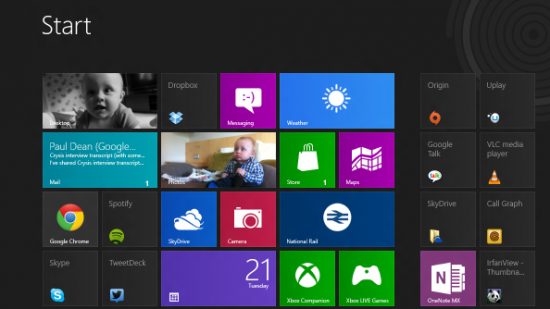
Windows 8 brings a new kind of computing design to the desktop. Once called Metro (until Microsoft realised that Metro is also the name of a German supermarket), it’s a design motif that’s meant to be appropriate across tablets, mobile phones, the desktop, and eventually, televisions. To be fair to Microsoft, Metro is a decent way of poking at your computer with a finger. But when you have the flexibility and precision of a mouse, it makes no sense. In Metro Most of your screen is taken up with white space. Text is bigger, the buttons are bigger, the borders are bigger. There’s less information, more wastage. It’s a complete mess.

The treatment of the desktop as an app is an out and out disaster

The Metro interface is Windows 8. The desktop that you’re used to is also there, but it’s built as a separate app. Think of it this way: Metro is the shell. The desktop is an app within that shell. If you want to start Steam, you’ll want to launch the Desktop app, and then launch Steam.

This is insanity. This is Windows 8.

Window management is a pain in the arse

Metro apps don’t have any window controls. If you want to swap between apps, you have to make a convoluted mouse gesture - move the mouse to the top left of the screen, and then down to select the window. You can’t minimise the app, and there’s no on-screen preview of what’s running to help you quickly switch between programs.

You can pick up windows and shunt them, say, to a second screen, which initially feels relatively useful. But I’ve discovered more than anything that you spend more time fiddling with their arrangement than actually doing anything useful with them.

Switching between Metro apps is a complete farce

I can’t get over how Microsoft have managed to break one of the basic functions of a GUI - swapping between running programs. Metro programs have no window controls and take up the entire screen. Therefore, there’s no easy way to switch between them using on-screen controls. You have to engage in unfamiliar mouse movements to swap between them.

Core apps that offer basic OS functionality are Metro only. And they’re awful

There are certain things that you do with your PC every day that should form the basis of the operating system. Email. Instant Message. Calendars. Media Playing. All of these functions in Windows 8 are carried out through Metro apps, and they are universally awful. There are no desktop apps included that do a similar job.
The email app is awful

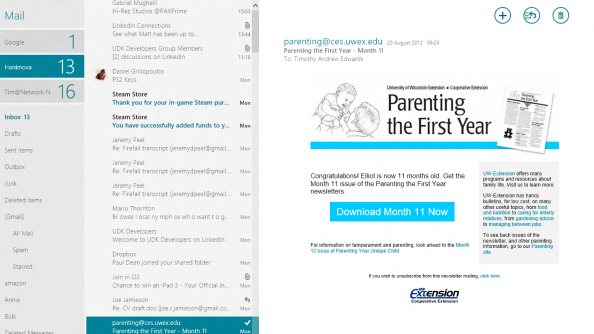
The email app is horrendous. It is the worst email client I have ever used. It’s a full-screen Metro abomination that hides or is missing basic and vital functionality (search, column sorting, filtering). It’s full-screen, but only shows a small sample of your messages - so the screen real-estate is massively wasted. If you have multiple email accounts, there’s no combined inbox view. It’s slow to check and sync your email - unless you force a manual refresh. And the first time you use it, you will struggle to find the ‘send email’ button. Pro-tip - it’s the (+) in the top right.

The messages app is bafflingly terrible

The instant message app is near unusable for day-to-day work or play. It’s a full-screen Metro app, so it takes up all your screen when all it needs to do is appear in a small box. There’s no combined contact view - if you want to start messaging people, have to enter a separate app (the people app), and select message from within that. It currently only supports MSN and Facebook messages - so you’ll still have to run a Google Chat or IRC client separately. But because it tries to combine message accounts, you’ll often discover that friends will receive messages over different accounts, at the same time. I’ve had situations where my friend is receiving the same message on Facebook and MSN at the very same time. Other times, the app has refused to let me even enter a message into the box. It’s so utterly and intensely ludicrous I hate it’s very guts.

The Calendar is unworkable

I’ve given up entirely on the calendar, because it’s terrible. Changing to a week or day view requires a right click to make the control interface appear. I can’t work out how to edit an appointment, nor can I work out how to delete an appointment. There’s no way to show events from just one calendar. I think it may well be easier to alter my own birthday than to edit when it’s currently set for in the Windows 8 calendar. I really want to be making this up.

The video and music players are abysmal

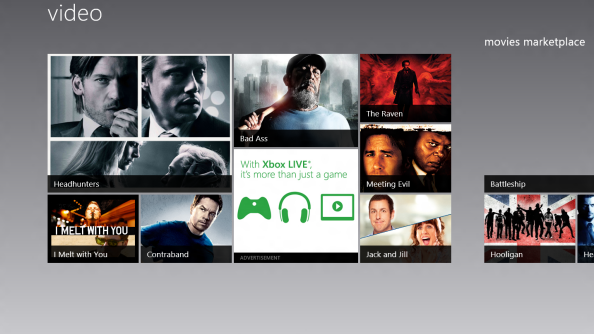
The default Windows media player is a full-screen Metro abomination. It’s slow, and the interface is clunky, and you’ll struggle to find and play the files you want. Worse, though, is that it struggles with complicated storage options. All of my music and video is stored on a Network Attached Storage device - but the Windows Video and Music players can’t seem to index those files. If I want to play something, you have to work through the folder structure using Metro’s awful internal file browser.
Internet Explorer just needs to stop

There are two versions of Internet Explorer, both bad. The first is the Metro browser, and it’s essentially unusable on a desktop which hides basic controls light refresh, the browser bar, the back button and everything else you use on a day-to-day basis behind a right click. The Metro browser is the default - so any Twitter links you click until you can turn it off, will be opened in the Metro browser.

The Desktop app version of IE isn’t necessarily terrible - it just occasionally takes over your default browser when you’re not looking. Despite me regularly returning the default browser to Chrome, IE still decides it wants to be the default option for opening links sent by IM, and the option to change it is greyed out.

It seems have inspired other developers to lose their mind

Google Chrome has now silently updated to integrate better with Windows 8. Now, when it’s started from the Start Menu, it opens up an entire full-screen window, and it can only be displayed in that full-screen window. The only route to prevent that happening is to install a shortcut to the app on your taskbar. When it’s started from the taskbar, it behaves as you’d expect.

Desktop windows have got more complicated and less useful

The ribbon from Microsoft’s office products is now integrated into the Windows interface. For instance, in the file manager, rather than the ‘view’ menu being neatly arranged into vertical options, if you click view on a window it displays a ribbon of all the options in the view menu with randomly placed icons next to each-other.

The Charms bar is bafflingly unusable

The charms bar appears when you hover your mouse in the top right or bottom right corner of your screen. It's meant to help you with basic but universal tasks. Like search, or sharing. But the search function rarely finds what you want - it will only search within Metro apps, and you have to specify the app you want to search in separately. The share button only works in Metro apps, as well - you can’t share from within any desktop apps. So it's entirely pointless. 

There are random and delightful bugs and compatibility issues

Yes, there are bugs in Windows 8. And yes, they’ll probably be ironed out as development continues. But some of the bugs I’ve encountered as so weird as to suggest my entire PC has been traumatised. In order: Star Wars: The Old Republic now simply refuses to update. I can’t play full-screen video on a second monitor in Chrome. There are no drivers available for the bluetooth chipset on my motherboard. Unity games, like the brilliant Brickforce, don’t work. It goes on, and on, and on.

If you’re using Metro apps, there is no clock

FFS.
It’s harder than ever to turn the sodding thing off

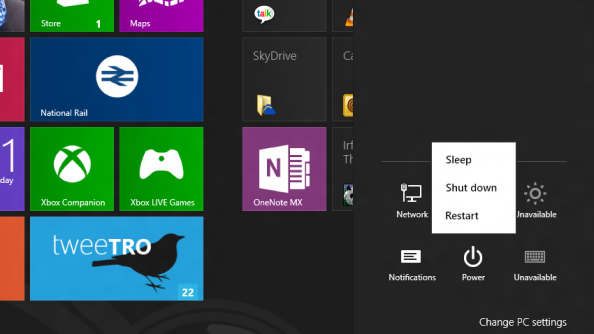
It took me nearly half an hour to work out how to turn off my PC. So: here’s exactly how you do it: You move your mouse to the bottom right or top right of your screen. You then click on options. You then click on power, and then finally, you click on the Shutdown option.

Windows 8 comes out in just under two months - it’ll be available from October 16th. You should not buy it.

Login to comment

Enter your PCGamesN username.
Enter the password that accompanies your username.
Forgotten your password?
avatar

It's bizarre. You'd think they want to hold onto the business desktop PC market at least.


avatar

I just hope Microsoft realise their mistake and roll it back for Windows 9. They won't of course, this is designed for tablets and tablets are the future (apparently) but a man can dream.


avatar

Well this is the first time I have been here, but sadly it will be my last. 95% of what is stated in this article is false. You simply do not know how to use Windows 8. Just like every other person who says Windows 8 is crap, you installed it for 10 minutes, decided not to learn how to use it, and are now saying its crap.


avatar

I wouldn't mind Microsoft utterly fucking it up if it meant that there was room in the market for new operating systems to develop.


Innovation banzai.


avatar

I'm living in hope that current Windows 7 users will be supported for a reasonable amount of time beyond the release of Win8. I tried the release candidate of Win8 on my laptop, but it only lasted a couple of days. I found it frustrating and frankly unfathomable.


I'll point out this is not in a "Well this is how I've always done it...." way - I'm comfortable using various GUIs and command line interfaces, but the implementation of Metro in Win8 for desktop and laptop computers makes no sense and felt clunky. I like Metro for phones, and I like the idea of unifying the system across the device ecosystem, but unifying the GUI is a step too far.


avatar

@nikana - I've been using various release candidates on my media centre PC for months. I've given it a fair chance. It just doesn't feel right for a desktop OS. I just can't bring myself to like the Metro start screen no matter how much I use it, the things just absurd. Maybe they'll improve it for the full release, I doubt it.


avatar

@nikana


I've been using Windows 8 since the public builds became available and I can testify that there isn't one single wrong thing in the article.


Such a weird dismissal of a serious problem. "You're not using it right" or "You don't know how to use it" isn't an argument when it comes to an OS. There shouldn't be -any- scope for people "not using it right" or not knowing how to use it. It's a fundamental part of what connects people to their computer and ENABLES them to do stuff.


avatar

I have used Windows XP since 2001, I have upgraded my computer so that it runs games Like Team Fortress 2 fine, and I will never move on, but Microsoft are basically forcing me to, dropping compatibility for it. For god's sake, XP was your most stable build. I have a Nokia 3310 and have no interest in mobile computing, so it is pointless. I don't respect you any more Microsoft, and if you force me off XP, I shall move to Ubuntu.


avatar

The unity games comment is not true. I am developing a unity game on windows 8 and it runs perfectly. Unity games did not run in the Release Preview but they do run in the RTM build that you can get off of Microsoft's website.


avatar

This is Tim Edwards second article slating Windows 8. If its you're opinion that Win8 is terrible thats fine but you seem to have an agenda.You may not believe this but there are ppl out there who respect the views published on this site and they will see your article and be put off EVER trying or even giving Win8 a fair shake. I've read both articles you have wrote on this site about Win8 and found them the most biased things I've ever seen on a PC review site. Where is your journalistic impartial professionalism? Its all just "I hate this!" "I dont like this because its different!" and the saddest comment of the lot "you have to make a convoluted mouse gesture" when talking about switching apps. That comment right there should have shown whoever your editor is that you shouldn't be publishing an article on win8 AT ALL! in fact if you find moving a mouse to the left of your screen "convoluted" you should maybe seek work in an other industry because obviously basic PC skills are beyond you. Change is always hard for ppl, but to call Win8 "baffling to use" is again another incredible comment from a man earning a living using a computer. I have used Win8 now for a few weeks and if anything MS dumbed it down making it EASIER to use, again HOW IS IT BAFFLING? I totally agree with nikana's comments this is a terrible article filled with biased uninformed information.


avatar

@McG46


Yes, because INVISIBLE CORNER MENU is so much less baffling than CLEARLY LABELLED OPTION.


avatar

LOL! This article is such bullshit and is filled with so many lies. The author doesn't even know how to use the damn OS. Let me obliterate some of this idiot's arguments.


"If you want to start Steam, you’ll want to launch the Desktop app, and then launch Steam."


Bullshit!! You can start Steam from a tile, without even going into the desktop.


"If you want to swap between apps, you have to make a convoluted mouse gesture - move the mouse to the top left of the screen, and then down to select the window."


Try Alt-tab dumba$$.


"It’s harder than ever to turn the sodding thing off"


You're kidding right.


Keep trying. Articles like this make me laugh.


avatar

@Palodin


"I've given it a fair chance."


No you haven't. You don't even know how to use the damn thing. You can't even turn the damn thing off, nor do you know how to cycle through apps with the simple Alt-tab. You're an idiot.


avatar


"If you want to start Steam, you'll want to launch the Desktop app, and then launch Steam."


- Clicking on a tile for a "regular" application in the Start menu will launch the application on your desktop and close the Start menu. Alternatively, while the Start menu is open, you could simply start typing the word "Steam" and after a few keys hit Enter to launch it.


"If you want to swap between apps, you have to make a convoluted mouse gesture - move the mouse to the top left of the screen, and then down to select the window."


- Alt + Tab still works. Windows + Tab is a new alternative shortcut that will let you view, switch between, apps open on a given monitor. On that note, you failed to point out the improvements Microsoft made to multi-monitor support (for instance, the ability to display the task bar on all monitors).


"I've discovered more than anything that you spend more time fiddling with their arrangement than actually doing anything useful with them."


- Is this really a valid complaint about Windows 8? The fact that you can't find an arrangement that suits your personal taste feels irrelevant to me. I could spend all day finding the perfect way to arrange my windows on Windows 7 -- but I choose not to.


"Core apps that offer basic OS functionality are Metro only. And they’re awful


[...]


The email app is awful


[...]


The messages app is bafflingly terrible


[...]


The Calendar is unworkable


[...]


The video and music players are abysmal"


- This entire section is a review of the apps that come with Windows 8, not Windows 8 itself. To review the apps on their own is fair, but don't turn them into a red herring. These apps are in no way forced on you -– there are plenty of desktop-based alternatives out there.


"All of my music and video is stored on a Network Attached Storage device - but the Windows Video and Music players can’t seem to index those files."


- I don't know if you use Windows 7 or not, but in order for Windows Search to index network drives you need to mark the drive as "Always Available Offline". If you're more familiar with Windows Media Player, just use that instead (it's still there – just type "Windows Media Player" in the start menu).


"Internet Explorer just needs to stop"


- As a web developer, I think IE10 is a big step in the right direction for Microsoft (albeit a little late in the game). That said, if you'd prefer to use Chrome (as I do), why not just uninstall IE? Just open the control panel (type "Control Panel" with the Start menu open and it will come up), then click "Uninstall a program" > "Turn Windows Features on or off", and uncheck the box next to "Internet Explorer 10". If that process seems familiar to you – it should. It hasn’t changed at all from Windows 7.


"Desktop windows have got more complicated and less useful"


- Criticism of the ribbon is completely fair. It is controversial – I'm not even sure what I think of it yet. Fortunately it collapses so it's not wasting space when you don't need it. But you're right, it might take an extra second or two the first few times you use it to get oriented. I'm not sure what you mean by "randomly placed icons". Little more than a quick glance is necessary to see that each icon is labelled.


"There are random and delightful bugs and compatibility issues"


- You have a long way to go to prove that the bugs you're experiencing are either common or entirely Microsoft's fault. Out of curiousity, how many drivers did you need to install? I didn't need to install anything – it all just worked. Even on Windows 7 I used to need to install video drivers before all four of my monitors would work properly. What were you installing it onto? Any chance it could be your hardware, and not the operating system?


"If you’re using Metro apps, there is no clock"


- It will appear in the lower left corner of your screen when you mouse over the charms bar. A tip, though, in case you want to take a quick glance at the clock in the task bar: simply press Windows + D to go straight to the desktop, check the time, then press it again to return to the app you were in.


There are 1,633 words in this review (excluding a duplicated sentence in your introduction). 897 (~45%) of them review the apps that come bundled with Windows 8 that can easily be removed and or replaced. If it was easier for you to go back to whichever operating system you used before than it was for you to uninstall a few apps, then I find it really hard to believe you ever intended to give Windows 8 a real chance.


avatar

Heh, I felt like this when Windows 95 was released, now that was a sea-change, but I don't see what the fuss is about with Windows 8. I have no use for Metro currently, so I just press the windows key and I'm back to work on the desktop. Granted there's no particular hook to update from 7 for desktop users apart from the improved boot up time, but the complaints in this article just make the author look a little foolish.


avatar

Tried using keyboard shortcuts at all? I find they're very useful when using desktop OSs.


"It took me nearly half an hour to work out how to turn off my PC". The fact it never occurred to the writer to consult help files or do a net search tells you all you need to know about his approach to working with a brand new OS - Hit Button! Button Not Work!! Hit Different Button!!!! BUTTON NOT WORK!!! ME AAAANGRY!!!! HIT LOTS BUTTON HARD!!!!! MACHINE NOT WORK!!!!!!! ME HATE MACHINE AND WORLD AND EVERYTHING IN IT, ME HAVE TANTRUM ON WEBPAGE!!!!!!!!!


What is he, two years old?


avatar

There r a lot of idiots like u out there who doesn't understand anything completely and come out writing articles as if you know everything. And those who blindly support him like #Rob Fear on, just to prove that this is an ill informed article, note the place where he says there is no search functionality in email app. This is the core functionality of all win 8 apps. You can just press WIN +q or open the search from charms bar and type what you want. I can understand if you are a layman or just a normal user who doesn't want to learn. But, I wont expect him to write an article about it without learning. That's idiotic.


avatar

Ok first off, yes, Windows 8 is primarily designed for tablets. This is because while most companies are busy switching over to Windows 7, Microsoft are able to test run their first proper tablet operating system. Metro isn't designed for desktop use, Microsoft need to get into the tablet market, and this is their way in.


The Calendar, Video, etc, last I checked, are only App Previews. They're not finished. It's like trying to eat a half-cooked chicken. Not a pleasant experience, but leave it in for longer and it'll be perfect.


Next, I've been using Windows 8 for at least 5 months, and I have yet to have a complaint. While some things may be a little different, it's basically the same as it always has been.


Finally, the clock. Seriously? If Modern UI apps did have the clock, where would you put it? Showing the Charms displays the clock, and that is VERY easy to do. I don't see the logic behind your complaint here.


Oh, and finally: http://wizardcm.com/post/thoughts-controversy-windows-8


avatar

Dude, it's just has some broken changes between Windows 8 and other versions of Windows OS.

It's step to the future.

You spoke now, like an old man, who didn't want change his habits.

I think that Windows 8 UI is a new wave of the UI.


avatar

First and last time i'll be visiting this site. Had to click on a stupid re-tweeted twitter link from a an Android loving mate didn't I... Most people already have articulated why this article is a totally abysmally baffling farce. Seriously, one click (or if your smart a reg hack) and you'll go straight to desktop and can miss the whole Metro experience. From there it's Win7 with a few adjustments. What Mail app where you using prior to Win8? If it was Outlook, install it. If it was Windows Live Mail, install it. Anything else install it. The Metro mail app is totally new and you're not forced to use it. Same goes with Calendar, Web Browser and a few other things you mentions. You can use what you used previously and maybe your existence will be slightly less unhappy. It's not as bad as you make it. Been using it on a laptop with a touchpad since CP and it works fine. It's like the change from Win 3.11 to 95 to XP to 7. There will always be haters of change. This is the same and may take a while for the oldies to accept it. But it's fresh bold and new and can't wait to get it on a Surface tablet.


avatar

I agree with the folks who are saying this article is a little off base. It's ok not to like windows 8 but to say it's not right for anyone is wrong. At first for me it was a little off putting with the new setup. Though after a few hours i started to enjoy it. The desktop not being the desktop issue is really not a big issue. Just hit the windows key and you're back to your desktop.


:) I like it and all my games have worked just fine as well.


avatar

It is incredible how many people jump in to defend any article critical of Windows 8. I'm not sure how people become so emotionally attached to an unreleased operating system. Almost feels like astroturfing to see so many people viciously attack those who have a different opinion on software than they do.


I think a lot of Windows 8 defenders seem confused by what the word "intuitive" means. If someone "doesn't know what they're doing", well that means it isn't intuitive darlings. And if that person is an avid gamer or tech person, insulting them doesn't make the operating system your fetishizing any better. If a gamer and technical user struggles with it, certainly the average PC owner isn't going to magically have a better understanding.


avatar

ignorance is why your uninstalling Windows 8, cry baby, you should go back a mac, and join all the other children in the play pen lol - also link from reddit brought me here, and i probably will not read anything else from this site, will pass on the ignorance


avatar

ignorance is why your uninstalling Windows 8, cry baby, you should go back a mac, and join all the other children in the play pen lol - also link from reddit brought me here, and i probably will not read anything else from this site, will pass on the ignorance


avatar

You should really stick to reviewing games--as you seem to be clueless as to what an OS actually does, how it affects the apps that run on it, and how those two correlate in terms of the release of the OS.


avatar

I have been using the windows 8 for a few months just upgraded to windows pro release. I have not found any real issues at all with its use. I rather enjoy the metro/apps view. I find it much easier to open up an app to get all my new/sports/information from one site in a very easily scrollable window.

There are many short cuts that can be created and placed on the metro app but it is just as easy to click win-d and see the desktop or clicking on the desktop icon on metro.

Honestly it is just like everything else in this world, no one is ever happy with anything. CHANGE is a big part of life and people get grumpy when things change and never look at the glass half full aspect. I for one enjoy it and have found no issues playing any games or doing anything I did with Windows 7.

I hate reviews of anything because they honestly are too subjective or people are out for blood. I need to try things on my own and get a feel for them and I suggest anyone that reads this does the same. Go in to it with an open mind and you will find many cool things you might like.

Have a great day!!


avatar

All we can say, if you don't see a pattern with MS and their OS's you're not looking very hard. Let me break it down. Starting with Windows 3.1, a good OS for its time, then we had 95 sort of made you irritated(although this may be the one OS that maybe breaks the good/bad mold). We then moved to Windows 98 an awesome OS. Then we had Windows Millennium which was an abomination. We followed that with Windows XP, again windows hit a home run. We follow that with Windows Vista (a huge waste of time) in order to get to Windows 7 (which is a great OS in my opinion) and if we follow history this OS was BORN TO SUCK. So wait a year, and get Windows 9 (or whatever they choose to call it.)


avatar

Wow, these comments smell of shill.


avatar

Your review is awful but has some valid points. The final verdict is that you need to learn how to use the OS properly before throwing your hands in the air and crying about it. You found a solution to half of your problems in this list after a bit of searching. What does that tell you?


avatar

I completely agree about this OS being catered for tablets, and yes I do believe it's a ~bit counterintuitive on a desktop. However you paint it as such a dismal failure, splitting hairs and whatnot, that it almost sounds like you're boycotting windows altogether. Calm down, quit being butthurt, and stick to windows 7 like the rest of desktop owners not using XP.


avatar

As soon as I read the title of the article "uninstalling Windows 8" I knew this guy was in trouble, It's an operating system, semantics, but still.


One user commented:

"I've been using Windows 8 since the public builds became available and I can testify that there isn't one single wrong thing in the article"


WRONG. I'm using the Windows 8 Enterprise Evaluation and I cant find a single thing WRONG with it, whats WRONG with you? Windows 8 has almost every feature of 7, but has a lot more functionality. Metro is like a more integral Windows Media Center app that seems like it can actually take off.


Using Windows 8 is different. You can complain that you shouldn't have to learn and adapt, but you did the same for Office 2010 and guess what? It was worth it in the end.


Windows 8 is not without flaws, but its great. Learn the differences and get over it.


avatar

1st - yes it's made for tablets which also works very well on desktop. you just hate it.

2nd - yes the desktop is treated as another app but once you open it, it remains open for the whole session. You don't need to go to the desktop to open steam if you have it pinned on start menu.

3rd - if you dont like modern ui apps just dont use them. you can use the desktop normally with a glorified start menu. Thats how i use it but I still like the modern ui apps and the gestures. They work pretty well with the mouse. you can also close apps with the middle click on the left pane.

4th - you can still use alt tab and win tab or drag the mouse to the top left and one click to change betweens apps.

5th - Yes there are desktop apps that do the same. you have wmp preisntalled and you can still install windows live essentials which brings the mail, calendar, messenger apps.

6th - you know, there will be alternatives to the email app... you say it suck, it actually works pretty well and you can search email opening the search on the charms bar

7th - you can snap apps. if you snap the messenger app with the small size you can work on any other app including desktop

8th - the calendar works great but could be better. still is really good because it supports sync with your google calendar

9th - i still use wmp so cant comment on that one

10th - internet explorer 10 is the only current browser that does css animations extremelly smooth even on slow graphic cards. i dont like how the interface is all hidden but you'll have alternatives anyway like you have chrome now

11th - ....

12th - ribbon on file explorer is a huge plus because many settings that were hidden in those menubars are now easy to find

13th - it's pointless for you because you dont want to use modern ui apps. i rarely use them too but that doesnt make it pointless for general public.

14th - of course there are bugs but just because you dont have a driver thats not a bug. try searching windows update. its a new OS so some software blocks certain features if doesnt recognize the OS. try compatibility with windows 7.

15th - yes there is. if you lock your pc you see a giant clock in front of your eyes. if you open the charms bar you see again a giant clock.

16th - on this point i agree with you but i guess microsoft made that way because users tend to press the power button on their pcs rather than open start menu and click shutdown.


please stop spreading Windows 8 FUD.


avatar

FYI the chrome bug where it won't show videos in full screen on secondary monitors has to do with its internal flash plugins. The bug exists in windows 7 too.


avatar

This is a very bad piece of journalism.

You use a source that doesn't state what you're implying.

You have factual errors, and state a lot of personal opinions as facts.

There's some valid points in there as well, but I really hope people rely on other sources as well, before they start to voice their opinion on Windows 8


avatar

"Well this is the first time I have been here, but sadly it will be my last. 95% of what is stated in this article is false. You simply do not know how to use Windows 8. Just like every other person who says Windows 8 is crap, you installed it for 10 minutes, decided not to learn how to use it, and are now saying its crap."


I installed Win8 several weeks ago. I mostly use Ubuntu, but I wanted to play all my old Steam games and GTA IV. It does suck. I read like 15 tutorials, but most of the stuff the writer said is still true.


Widely used Operating System like Windows has to be intuitive and easy to use. Windows is used by almost all the businesses, schools, etc. If it is hard for tech-savvy people like me to use it, imagine how many old people will have problems with it.


In conclusion, I ended up using Win8 only for games. I thought it would be useful for some other programs, like Photoshop, but it is just impossible to use. I still use Ubuntu for everything else. LibreOffice and Google Docs work perfectly, and MS Office runs in wine (I don't really need it).

Also, a lot of the games can be played with Wine, and right now they are porting Steam for Linux, so I can't wait to uninstall Win8.


avatar

Tell you what I am actually enjoying the much more opinionated feel to this site. I mean without opinions what are we left with? Yep, the advertorial articles paid for by the manufacturers designed to support the products regardless of it's quality, that you get on pretty much all the big editorial sites.


I have been using Windows 8 for the last few months on both desktop and tablet. Very happy with it on tablet, and as Tim says it is abysmal on desktop. I too am rolling back to Win7 thanks.


avatar

Yes, Windows 8 is an epic failure. But so is every Windows before it, OS X / iOS, KDE, Gnome, XFCE, etc. Just not on such a staggering level (except for iOS).


But to be fair, a large part of your problems is because you are so used to the Windows monoculture, that any non-Windows-like behavior in completely alien to you and beyond what you can cope with. If you think all GUIs have to have a desktop, overlapping windows, a task bar and a start menu, and mainly be used with the mouse, you’re like that.


There are far better ways to do things.

Like a tiling window manager (the concept of a “desktop” doesn’t apply to those, since it’s never visible), or the window managing control features of Compiz (just don’t use the pointless bling :), and of course keyboard shortcuts with a list of currently available ones (like a prototype I wrote).

And then there’s Maya and all of its adaptable, extensible, scriptable, elegant and emergent interface.


But of course, Windows 8 does NONE of those either. ^^


In essence this is another battle of dumb vs. dumber. Yes, the thing is shit. But your preferences are not really much better from the perspective of what’s actually possible.


avatar

Finally! It seems that the community has given up trying to help Microsoft since Vista was released. Very few people have spoken out against Windows 8. I'm very happy that you did. I refuse to upgrade and am sticking with Windows 7.


avatar

jesus fucking christ. this article is basically the blog version of RAGEQUIT. my god.


is windows 8 the best OS evar??? no, not by a long shot. but this guy is just bitching about the dumbest stuff. if you don't mind, I've copied a list of the sections he talks about and I have my commentary.


Windows 8 is really meant for tablets

no shit sherlock. it's an OS that is trying to tie desktops, laptops, and tablets together. the only thing within win8 that is meant for tablets is the start menu. if you go to the full desktop environment, it's not tablet friendly. suck my dick.


The treatment of the desktop as an app is an out and out disaster

really? a disaster? i didn't know forcing users to have one additional click is on par with hurricane katrina or a tsunami. and, atleast in the consumer preview from a few months ago, I installed firefox on the desktop environment and was able to create a short cut that appeared in the metro start screen. crisis averted, i guess. fucking moron.


Window management is a pain in the arse / Switching between Metro apps is a complete farce

really, this is a little bit of an issue. but i think it's driven more by my lack of metro experience than anything. i do find it difficult to switch between apps and such, but you know what? if you hover your mouse on the left side of the screen, YOU SEE THUMBNAILS OF ALL OPEN METRO APPS. give me a fucking break, dickcheese.


Core apps that offer basic OS functionality are Metro only. And they’re awful (mail, messaging and calendar are examples he uses)

they aren't very great. but neither are the mail, calendar, and messaging apps on android or iOS. yes, searching in mail should become standard. universal inboxes are nice. they aren't perfect, but I think he overreacts pretty hard here.


The video and music players are abysmal

i haven't used these much at all, but i do recall running into issues playing videos. it's the basic codec issue all over again. if you don't like WMP as the default media player in win7, you aren't going to like the defaults in win8. like always, i'll probably install VLC or something like that. big fucking deal crybaby.


Internet Explorer just needs to stop

WAAAAAAAHHHHHHHHHHHHHHHHHHHHHHHHHHHHHHHHHHH. yes, IE isn't the best.. but to be honest, IE isn't all that bad either. stop living in 2005 you fuck hole.


It seems have inspired other developers to lose their mind

i'm not a developer, so i can't really comment on if win8 sucks from a dev standpoint. now that i think of it, i don't think the guy who wrote the article is either, so he should just STFU.


Desktop windows have got more complicated and less useful

his biggest issue is with the ribbon layout for all menus. i hated the ribbon within office when it first came out. now i like it a lot. i if i switch to office 2003, i'm like WHERE ARE MY FUCKING OPTIONS. the ribbon, after adjusting, makes things better. what a queef.


The Charms bar is bafflingly unusable

the charms bar is a little odd, and sometimes the 'menu-centric' options aren't very intuitive. but baffingly unusable? do you think a pencil is unusable too? dumbfuck.


There are random and delightful bugs and compatibility issues

THIS IS A BETA OPERATING SYSTEM. WHY THE FUCK ARE YOU BITCHING ABOUT GAMES NOT RUNNING WHEN THEY AREN'T OFFICIALLY COMPATIBLE WITH THE OPERATING SYSTEM. DO YOU BITCH ABOUT STEAM NOT RUNNING ON LINUX???? FUUUUUUUCCCCCCCCCKKKKKKKKKKKKK


If you’re using Metro apps, there is no clock

WOW. what a deal breaker. no clock. i guess your fat fucking ass won't know what time it is to make sure you hear the pizza delivery guy come with your chicago deep dish pizza. you fucking deep dish asshole.


It’s harder than ever to turn the sodding thing off

so instead of 3 clicks like winXP (start - shut down - shut down), or 2-3 clicks on win7 (start - shutdown or start - arrow next to shut down - shut down), you are bitching about 4 clicks (settings - options - power - shut down). FIRE AND BRIMSTONE, FOUR HORSEMEN....IT'S THE END OF THE FUCKING WORLD. because in winxp/win7...to shut down the computer you need to click on start is SO FUCKING INTUITIVE.


avatar

awful...


avatar

I find it frankly amusing that the people defending Windows 8 can't actually defend it in a civil way and resort to childish insults against those who don't like.


The article? Yeah, it's a bit rant-ish. Maybe there are some things that the author didn't know about. But instead of turning him in the right direction, all he gets are responses about how wrong he is and how he doesn't know how to use Windows 8 rather than honest help. Maybe, if people who liked Windows 8 were actually helpful, we'd be seeing people embrace these changes, but nope, nothing but constant childish insults. It alienates people away from Windows 8. Who would want to associate with people like that?


If there was an active community helping support people switching over to Windows 8 (please point me in this direction if there is one), then Windows 8 adoption would probably increase. Sure, it might not be as intuitive to some, and the old way certainly still works just fine, but if people are helping others learn about Windows 8, it might just become the next big thing, assuming Microsoft can keep their act together with it. .


(to be fair, I honestly don't know much about the author of this particular piece, so I don't know how he'd respond to people actually being nice and helping others along, but I've seen several people get responded to in much the same way when they wrote negative Windows 8 posts in a decent way, even if they would have reacted positively to a helpful community)


avatar

I actually have a touch screen but I have to say I am very much put off getting this. I have not tried out the trial because I get extremely annoyed at software that isn't perfected. I don't mean to, I am just snarky. Speaking as someone who spends pretty much every waking moment using computers this sounds exactly like the sort of things that I see all the time and really infuriate me. I don't wan't to create any kind of flame war but it looks to me like MS have been driven insane by the success of the iPad. Hiding options away where they can't be found is a typical trick that infuriates me with so many Mac programmes. Don't get me wrong, I love my macbook and generally use it in preference to windows but there are certain things in the stock programs where Apple have decided for reasons of aesthetics that something really important should be hidden invisibly away where you will never think to look for it so that if you only use it once every couple of months you have to use google to find out where it is each time. MS have obviously decided this lunacy is part of the winning formula. However without the talent of the Apple designers they are like blind men stumbling around in the dark. I suppose that if Windows 8 turns out to be a disaster they will tell us we are holding it wrong or some rot like that.


avatar

Honestly all you did was complain about the apps, a completely optional thing to use.


You can choose to ignore them and use it just as windows 7 with some slight differences.


I like windows 8, it runs faster, boots faster, is cleaner, and is exactly like windows 7, only without a start button, which is replaced by the easy to use metro page that can act as simply a start bar, instead of an app gathering. I learned nothing useful from this review other than the apps suck, so what? that's not what makes any OS, it's complaining about something a computer doesn't even need.


I understand windows 8 is proud of their apps, and the calendar and mail apps work great for me, but they are all optional, and can be easily ignored.


avatar

Honestly all you did was complain about the apps, a completely optional thing to use.


You can choose to ignore them and use it just as windows 7 with some slight differences.


I like windows 8, it runs faster, boots faster, is cleaner, and is exactly like windows 7, only without a start button, which is replaced by the easy to use metro page that can act as simply a start bar, instead of an app gathering. I learned nothing useful from this review other than the apps suck, so what? that's not what makes any OS, it's complaining about something a computer doesn't even need.


Sure, I understand windows 8 is proud of their apps, and the calendar and mail apps work great for me, but they are all optional, and can be easily ignored. The OS itself is good.


avatar

I tried to read this article objectively, being a long-time windows user myself, until I noticed the repetitive use of the word 'app'. Mind my ignorance, I would assume the word 'app' is short for the word 'applet' which is by definition a 'small program', a term largely coined and marketed by Apple with its iPhone.


And my point--obviously the author holds a bias against Windows and Microsoft. Granted, even I will roll my eyes with Metro, the advantage with Windows, and hopefully every competent operating system is the ability to turn features on and off to your liking--the operating system conforms to your needs. Metro was largely created to unify all Windows devices across different platforms, so we'll see how that pans out. There is also the underlying fact that it's still hasn't been officially released. Granted it's a release candidate, it doesn't mean that they're not going to work out last minute kinks.


In my opinion, this article is above nothing more than petty nitpicking, just as it's the author's opinion that Windows is that bane of the computing world.


avatar

I'm a oldschool windows guy and love my Win7 Home? PC. But i bought an Asus Slate with Win7 and Touch/Pen capability (instead of an iPad) and it was an Pain in the Ass !! Today i installed Win8 on my Asus Slate and it's Rock'n'Roll !!! BOMB !!! It's working like an iPad BUT i can change to my beloved Windows (without a StartMenue;>). I don't know if i would install Win8 right now on my Desktop (rather later when the first dumb things are cleaned) but the Experience on the Slate with Touch is now iPad-Competative IMHO. It's really really super cool with this Metro stuff.......and YES it's Touchy Design.....so don't compare to a full Win7 Gamer PC. Win8 want to close the GAP between Touch and normal OS'es and for the first try i think it's good. Just my 2 Groschen ;)


avatar

20 Years in this field. Every customer I have will have to hire 25% more staff to use Windows 8. Don't know about you. Maybe everyone should put there money where there mouth is. I dumping my MS stock next week because MS stock will take 20 to 40 percent hit. Don't worry it should climb back to it's old level in the next 2 years.


avatar

@Joe_HTH (I'll quote his post since it was a while ago)


""I've given it a fair chance."


No you haven't. You don't even know how to use the damn thing. You can't even turn the damn thing off, nor do you know how to cycle through apps with the simple Alt-tab. You're an idiot."


Well, thats nice isn't it? Lets stoop to childish insults. Perhaps i was a bit brief in my earlier post. I was in a hurry. Although I'm fairly certain I never made the points you're quoting me on. *checks post* Nope, didn't. I reiterate, I gave it a fair chance. I learnt how to use it, I know all the little tricks and what not, I still found it an inferior desktop experience. It just feels like it was designed for other devices.


What I will say for it is that it was easier to teach my technophobic parents how to use the system. Thats good. Really. It saved me a lot of hassle. But I think the new UI should be optional, I doubt many people would have an issue with it then.


So I'll stick to my original post, I hope they learn their mistake and provide an OS that isn't clearly aimed at tablets. Don't get me wrong, for tablets I'm sure the whole thing is fantastic.


avatar

Thank you for proving that idiots won't like Windows 8.


avatar

The best thing about this article is not the totally legitimate complaints of the author, but the illiterate Microsoft fanboys defending it. You guys are the best advert for buying a Mac yet! Came here from Reddit, would come back.


Pages

Warhammer 40,000: Armageddon is a turn-based strategy game all dotted about with hexes

Company of Heroes 2 cinematic trailer suggests story may not be all rose-tinted for Russia

Wildstar video details the different character paths and the many ways you’ll die

Battlefield 4 screenshots show man leaning listless against a tree and explosions

Metro: Last Light season pass offers enough single player DLC to last you the summer

Half-Life writer Marc Laidlaw goes back to Breen with fanfiction Twitter account

MechWarrior Online grows to encompass the Canyon Network map and two new mechs

Call of Duty: Ghosts screenshots drift spookily up through the floor into your monitor

FIFA 14 is getting a new engine on consoles, but not on PC

Thief is on the Xbox, which means we get a screenshot

Xbox One Kinect for Windows is coming "at some point down the line"

14.5 million people have played Diablo 3, for an average of 193 hours each

Battlefield 4 will report for duty on October 29

Neverwinter servers sent back in time to prevent Auction exploit from happening

Call of Duty Ghosts revealed: sympathetic characters, dog companion, massive explosions

Door Kickers alpha available now, hurt doors and shoot men with real time tactics

Stompy bots crash into Kickstarter with Heavy Gear Assault

Guild Wars 2 price tag cut permanently